
Windows execution artifact viewer

See everything that actually ran on this machine.

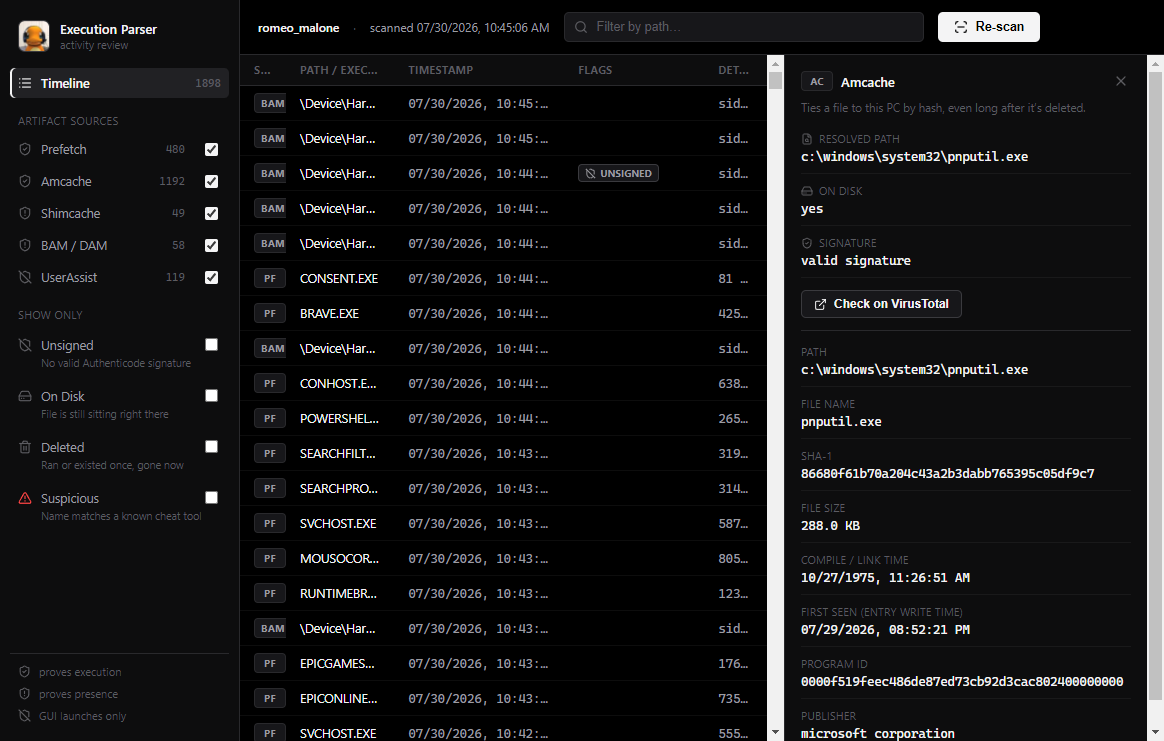
Prefetch, Amcache, Shimcache, BAM/DAM, and UserAssist each hold part of the story, and each one can be wrong in a different way. Execution Parser reads all five directly from disk and lines them up in a single timeline, so you can corroborate one artifact against another instead of taking any single one at its word.
v1.0.0 · 77 MB · Windows 10 / 11, x64 · run as Administrator for full results

Execution Parser timeline view with the detail panel open, showing Prefetch evidence: resolved path, on-disk status, and signature.

One tool, five artifacts, no guessing which one to trust

Every execution artifact on Windows has a blind spot. Execution Parser doesn't hide that — it labels each record with what the artifact actually proves.

Prefetch

proves execution

Run count, up to 8 historical run timestamps, and every file and DLL that execution loaded. Decompresses Windows 10/11's Xpress-Huffman .pf files natively.

Amcache

ties a binary to the machine

SHA-1, file size, compile time, and first-seen time — pulled straight from Amcache.hve, so a deleted binary still leaves a fingerprint.

Shimcache

proves presence, not execution

AppCompatCache entries with last-modified time, and the execution flag where the OS version actually sets one.

BAM / DAM

per-user, last execution only

Background/Desktop Activity Moderator timestamps, keyed by user SID. No run count, but reliable on Windows 10 and 11.

UserAssist

GUI launches only

Run count and last-run time for anything double-clicked from Explorer or the Start menu. Misses command-line and scripted execution entirely — Execution Parser decodes the ROT13 key names for you.

Before you run it

  • Windows 10 or 11, 64-bit.
  • Run as Administrator — the app requires it and will prompt via UAC. Prefetch, Amcache, and the SYSTEM hive are protected even from local standard accounts.
  • Nothing is uploaded anywhere. Every artifact is read and parsed on the machine you run it on.
  • SYSTEM and the current user's registry are read through a hive snapshot (reg save), not a live handle, so nothing gets held open or modified.

What it doesn't do

  • No SRUM (SRUDB.dat) support yet — it's an ESE database and genuinely one of the harder Windows formats to parse correctly.
  • No remote collection. Point it at the machine you're sitting at.
  • It reads artifacts; it doesn't interpret intent. Corroborate across sources before drawing conclusions.

Execution Parser

A boot-activity review tool for Windows 10 and 11.

Download for Windows — v1.0.0

77 MB · NSIS installer · x64